How can finance teams use AI Agents to prepare VAT returns?
Turn your ERP or Accounting system into industry-specific VAT workbooks: VAT treatments mapped to appendices, currencies converted and issues flagged for review.

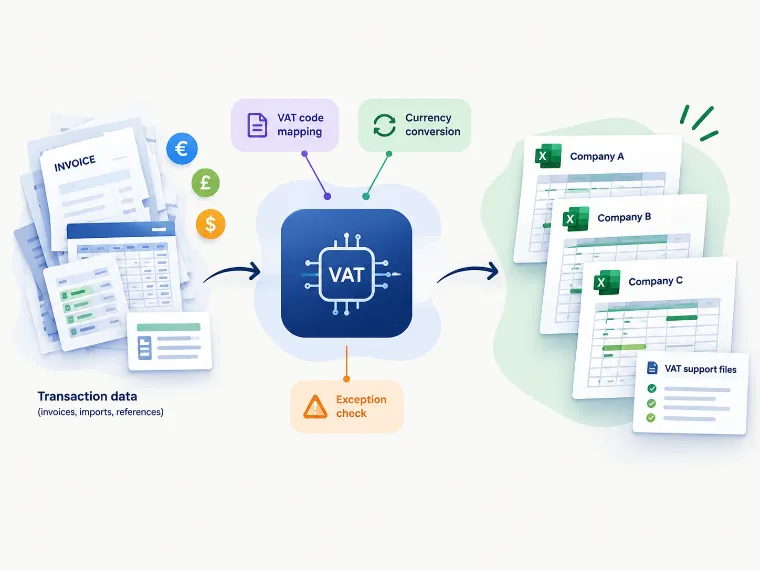
Key takeaways
- The AI Agent reads structured transaction imports, a VAT-treatment reference and company information to prepare VAT support workbooks.
- Transactions are mapped to configured VAT appendices, with currency conversion applied according to the rules in the process specification.
- The workflow can flag issues such as unknown VAT treatment, unreadable dates and missing company records for follow-up.
- The output supports review and preparation; it does not submit in this case a VAT return or replace professional validation.
Short answer: VAT teams can handle the VAT documentation by using an AI Agent that reads transaction data, maps each line to the relevant VAT appendix, applies VAT rules, makes currency-conversion and builds Excel workbook for multiple entities at once. The files are prepared for review; the AI AgentAgent does not submit VAT returns in this case study, neither it replace compliance sign-off.
| Process | Tax & VAT |
|---|---|
| Industry | Professional services |
| Systems | Excel |
| Result | Company-specific VAT workbooks generated automatically, with exceptions flagged for review. |
Book a demo
See your VAT and tax checks running automatically.
30-minute call with an AI agent expert.
See Your AI Agent in ActionNo commitment · Clutch-verified reviews
On this page
How can finance teams use AI Agents to prepare VAT returns?
Preparing VAT support files can involve collecting transaction exports, checking VAT codes, organizing sales and purchase lines, and moving the relevant data into the required appendices. When this work is repeated for multiple companies or reporting periods, the process can be time-consuming and sensitive to inconsistent inputs.
An AI Agent can take on the preparation work. In this use case, the VAT Agent reads the transaction data, VAT-treatment reference and company information file, then creates an Excel workbook for each company required. The goal is to organize the data consistently so a finance professional can review and understand the resulting VAT figures before using them for compliance in the wider VAT process.
What inputs does the VAT Agent use?
The Agent works with structured transaction data which it can export from the company’s existing accounting or ERP environment. Rather than requiring finance teams to replace their current systems, it uses the existing and reference files to prepare the VAT support workbooks in Excel in this use case.
The workflow depends on three supplied inputs: the transaction import, a stored VAT knowledge with relevant treatments and a company information file.
These inputs need to follow the expected structure, this enable a much higher accuracy. The AI Agent uses the supplied VAT knowledge rather than independently determining the correct VAT treatment for every transaction. The quality and completeness of the source therefore remain important to the reliability of the work done by the Agent.
How does the VAT AI Agent work?
First, the Agent reads the transaction data and identifies the company and transaction details needed for the VAT treatment. It then uses the VATknowledge to map sales and purchase transactions to the configured VAT appendices.
The process creates a separate workbook for each company, keeping the supporting information organized for review.
Currency conversion follows the rules described in the process specification. For sales, the supplied exchange rate is used when available; otherwise, the process uses the European Central Bank (ECB) rate. For purchases, the process uses the ECB rate. In this use case, a monthly average of the foreign exchange rate on the ECB is applied, so the Agent can even apply this type of specific internal rules. These rules should be checked against the organization’s approved requirements before the workflow is relied on.
The process is intended to support monthly, quarterly or annual filing cycles. The reporting period and input files must be provided in the expected format for a run to produce useful working documents.
What happens during a typical run?
A typical workflow follows five steps:
- Prepare the input files. Gather the transaction information, VAT input and company information file.
- Identify the data for the selected reporting period.
- Generate the workbooks. Create a separate Excel workbook for each company, with transactions mapped to the configured VAT appendices.
- Review exceptions. Check the logs and any error workbook for issues requiring correction or manual follow-up.
- Validate the working documents. Review the prepared files before using them as part of the VAT compliance process.
The workflow can flag issues such as VAT treatment that are not present in the reference, dates that cannot be read and company records that are missing. These exceptions should be resolved or assessed by the finance team rather than assumed to be correct automatically.
What results can finance teams expect?
The supported outcome is a more structured compliance process. Transaction data is organised into company-specific workbooks, mapped to configured VAT appendices and accompanied by logs or an error workbook that can help identify issues.
This can give finance teams a consistent starting point for reviewing VAT support information. In this use case, this represents the one FTE due to the scale of the implementation but also, error-rate reductions close to zero..
The AI Agent however does not file or submit a VAT return in this use case. It prepares supporting workbooks for review, while responsibility for validating the VAT treatment, resolving exceptions and completing the compliance process remains with the relevant finance or tax professionals.
Company-specific VAT workbooks generated automatically, with exceptions flagged for review.
When is this AI Agent not a good fit?
This approach may not be the first suitable Agent to prioritize if the transaction data is unstructured, the required reference files are unavailable, or the VAT treatment has not been agreed. It should also not be treated as a substitute for tax advice, review of VAT treatment or submission of a VAT return.
A few implementation details should be confirmed before relying on the workflow in a live process. The specification leaves open how runs should behave when an import contains only sales or only purchases, how corrected VAT rates should be reflected in the output, and how the temporary Reports folder is managed because it is cleared at startup.
These points should be resolved with the process owner and tested against the intended workflow before the AI Agent is used for regular reporting.